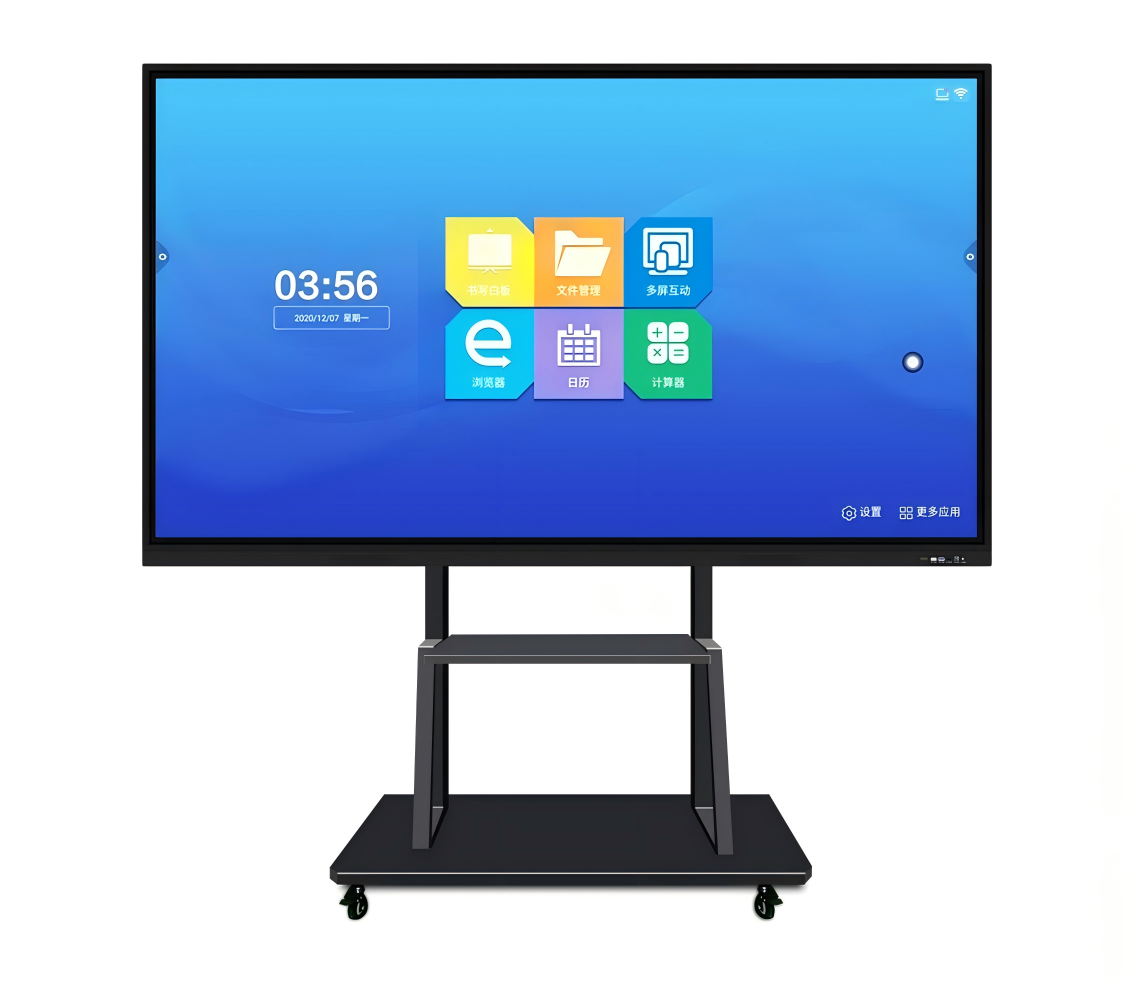
162-inch all-in-one conference machine
A 162-inch all-in-one conference machine combines seamless UHD visuals, wireless collaboration, and front maintenance to support efficient meetings, teaching, and presentations.
Why Choose a 162-Inch All-in-One Conference Machine
Choosing a large conference display involves more than screen size and resolution. Meeting organizers also need to consider installation space, presentation clarity, equipment integration, operating convenience, and maintenance efficiency. A 162-inch all-in-one conference machine combines a large LED display with integrated audio-visual functions and meeting software, helping reduce the need for multiple separate devices in professional meeting environments.
With a 16:9 screen format and Full HD resolution, this type of display is designed for corporate conference rooms, government meeting spaces, academic lecture halls, and business showrooms. Its large viewing area allows participants to follow presentations, documents, charts, and video content more comfortably. For organizations seeking a centralized meeting solution, an integrated design can also simplify equipment management and daily operation.
Full Front Maintenance for Faster Servicing
Maintenance access is an important consideration when installing a large-format LED display. Conventional installations may require sufficient rear clearance for technicians to inspect internal components, which can complicate placement in rooms with limited space. A 162-inch LED conference display with front maintenance allows servicing from the front, providing greater flexibility for wall-mounted and bracket-mounted installations.
The display also supports hot swapping, which can help technicians replace compatible components without extensive dismantling. The actual replacement procedure depends on the component design and manufacturer instructions, so buyers should confirm which parts support this function. When supported components can be replaced efficiently, maintenance teams may reduce repair time and minimize disruption to scheduled meetings.
Before installation, project planners should evaluate the mounting structure, access requirements, power supply, and available service space. These checks help ensure that the display remains accessible for routine maintenance throughout its operating life.
Integrated Audio-Visual Design Simplifies Meeting Rooms
Meeting rooms often contain separate displays, audio equipment, presentation devices, and control interfaces. Managing multiple devices can increase installation complexity and create additional connection points that require troubleshooting. An all-in-one conference display integrates key functions into a consolidated design, helping simplify the overall meeting setup.
This integrated approach can reduce equipment clutter and make daily operation more straightforward for meeting hosts. Instead of switching between several independent devices, users can access supported presentation and collaboration functions through the display's built-in interface. The result is a more organized working environment for corporate discussions, training sessions, and formal presentations.
Integration does not eliminate every external requirement. Network access, room acoustics, peripheral devices, and compatibility with existing conferencing equipment may still influence the final configuration. Buyers should identify their meeting workflow and confirm the supported connections before purchasing.
Wireless Screen Casting and Interactive Meeting Tools
Efficient meetings depend on how easily participants can share information. Built-in wireless screen casting allows compatible devices to present content on the large display without relying exclusively on physical video cables. This can make it easier to switch between presentations, documents, and other meeting materials, particularly when several participants need to contribute.
The integrated software also includes file management, a meeting whiteboard, a welcome interface, and functions for controlling the large display from a smaller device. These tools can support collaborative discussions, presentation preparation, and reception-area communication. The availability and operation of individual functions depend on the installed software and supported devices.
For organizations evaluating a smart conference machine for business meetings, usability should be a central selection criterion. Buyers should verify wireless compatibility, supported file formats, network requirements, and available collaboration features. A familiar interface and straightforward content-sharing process can help reduce the time spent preparing equipment before meetings begin.
Remote Control for Convenient Daily Operation
Large conference displays are used by people with different levels of technical experience. A straightforward control method helps prevent routine adjustments from interrupting presentations. The supplied remote control allows users to adjust brightness, volume, and color temperature, switch input signals, and place the display in standby mode.
Adjustable brightness helps users adapt the screen to different indoor lighting conditions. Color temperature settings can also change the overall appearance of displayed content, while volume control provides convenient access to audio adjustments. Input switching makes it easier to move between connected sources during meetings.
For frequent daily use, these controls can improve operational convenience without requiring users to navigate complex menus for every adjustment. Before deployment, administrators should familiarize staff with the main controls and confirm the available signal inputs meet the room's requirements.
Display Performance and Viewing Comfort
The 162-inch display features a 16:9 aspect ratio and a resolution of 1920 × 1080. Its large viewing area supports presentations, business documents, video content, and shared visual materials in medium-to-large meeting spaces. The recommended viewing distance is at least 3.7 meters, making room dimensions and seating arrangements important considerations during project planning.
The screen uses SMD LED technology, which is widely applied in commercial LED displays. Consistent LED output and careful calibration are important for maintaining uniform brightness and color across the display surface. A seamless visual area without conventional panel stitching gaps can also help presentations appear more continuous.
The display offers adjustable brightness from 150 to 800 nits, a refresh rate of 3840 Hz, 16-bit grayscale, and a stated contrast ratio of 5000:1. These specifications should be evaluated according to the room's ambient light, content type, and viewing requirements rather than considered in isolation.
Key Specifications for Project Planning
| Parameter | Specification |
|---|---|
| Screen size | 162 inches |
| Aspect ratio | 16:9 |
| Resolution | 1920 × 1080 |
| LED type | SMD1515 |
| Screen dimensions | 3600 × 2025 × 27.8 mm |
| Overall dimensions | 3616 × 2173 × 45 mm |
| Total weight | 202.2 kg, including bracket and wall-mount accessories |
| Operating system | Android 7.0 |
| Processor | ARM Cortex-A73 dual-core with Mali-450 five-core GPU |
| Memory and storage | 2 GB RAM and 8 GB storage |
| Brightness | 150–800 nits, adjustable |
| Refresh rate | 3840 Hz |
| Viewing angle | 160° horizontal and 140° vertical |
| Installation | Bracket mounting or wall mounting |
| Maintenance | Front maintenance |
The display's physical dimensions and weight should be checked against the room layout and mounting structure before delivery. The specified electrical requirements are 100–240 V at 50/60 Hz. Average power consumption is listed as 3000–4800 W, with a maximum of 6000 W, so electrical capacity and operating costs should be assessed during installation planning.
Where a 162-Inch Conference Display Works Best
A large all-in-one conference machine can serve different professional environments, depending on room size, content requirements, and collaboration needs. Government and corporate meeting rooms can use it for presentations, internal communication, and document review. Academic lecture halls can display teaching materials and visual content, while corporate showrooms can use the large screen for product presentations and brand communication.
Business reception areas and campus halls may also benefit from large-format visual communication. However, buyers should assess viewing distance, ambient lighting, content readability, and operating schedules before deciding whether this screen size is appropriate. A display that fits the wall may not necessarily provide the best viewing experience if the nearest seats are too close or the room lighting is unsuitable.
QUIET RAIN can evaluate the display requirements according to installation dimensions, mounting preferences, meeting functions, and expected operating conditions. Confirming these factors before procurement helps organizations plan a practical installation and avoid unnecessary configuration changes.
FAQ
What Are the Main Benefits of an All-in-One Conference Machine?
It combines a large LED display with integrated functions and meeting software, helping simplify equipment arrangements and everyday operation. Wireless casting, file management, and whiteboard tools can further support collaboration.
Does the Display Support Front Maintenance?
Yes. The specified maintenance method is front maintenance, and the product supports hot swapping. Buyers should confirm which components can be replaced using this procedure.
Can Users Share Content Wirelessly?
The display includes wireless screen casting. Actual compatibility depends on the connected device, software, and network conditions, so these requirements should be checked before deployment.
What Should Buyers Consider Before Installation?
Review screen dimensions, total weight, viewing distance, mounting structure, electrical capacity, maintenance access, and room lighting. The recommended viewing distance is at least 3.7 meters.
Is a 162-Inch Display Suitable for Corporate and Academic Environments?
It can be suitable for larger conference rooms, lecture halls, showrooms, and other indoor spaces requiring a large shared display. Room dimensions, seating layout, and content requirements should determine the final choice.
Related products
-
 Contact Us
Hangzhou Blue Sun Electronic Materials Co., Ltd. is located in Qingyun Industrial Park, Taihuyuan Town, Lin’an, Hangzhou, Zhejiang Province.
-
-
-
 Contact Us
Epoxy Resin Prepreg has excellent bonding performance, good technological operation, wide window Good fluidity and wettability, low water absorption and good storage performance.
-
 Contact Us
G-11 glass epoxy shares many similarities with G-10. It’s made from a halogen-free epoxy resin and woven fiberglass substrate.

Reviews
There are no reviews yet.